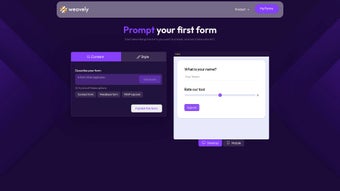

Download Weavely – AI‑Powered Form Builder, Free & Secure
Введение
Weavely — это облачный, основанный на ИИ конструктор форм, который переосмысливает процесс создания онлайн‑опросов, анкет и страниц регистрации для отдельных пользователей, команд и предприятий. Вместо того чтобы тратить часы на выбор шаблонов, формулирование вопросов и настройку макетов, пользователи просто описывают, что им нужно, загружают существующий документ или записывают короткую голосовую заметку. Модуль обработки естественного языка платформы анализирует ввод, извлекает соответствующие поля данных и мгновенно создает полностью функциональную, адаптивную форму, соответствующую визуальному стилю бренда. Такой подход не только ускоряет процесс создания, но и снижает количество человеческих ошибок, гарантируя, что каждый вопрос ясен, согласован и правильно типизирован. Основное обещание Weavely — превращать идеи в отшлифованные формы одним запросом — делает его привлекательным решением для маркетологов, запускающих кампании обратной связи, специалистов по персоналу, разрабатывающих опросы сотрудников, и небольших компаний, переводящих бумажные документы в цифровой формат. Безопасность встроена в сервис: все передачи данных зашифрованы TLS, а система соответствует требованиям GDPR и CCPA, что дает пользователям уверенность в защите персональной информации. Как SaaS‑решение, Weavely получает постоянные обновления, предоставляя новейшие улучшения ИИ, новые типы вопросов и варианты интеграции без какого‑либо ручного вмешательства. Независимо от того, используете ли вы Windows, macOS, Linux, iOS или Android, адаптивный веб‑интерфейс безупречно работает в любом современном браузере, делая Weavely действительно платформенно‑агностичным.
Ключевые функции и преимущества
- AI‑Driven Form Generation: Transform plain‑text prompts, voice recordings, PDFs, or images into complete forms within seconds.
- Automatic Question Extraction: The engine intelligently identifies data points and suggests the most suitable question types (multiple‑choice, rating scales, open‑ended, etc.).
- Brand‑Centric Styling: Upload a brand guide or logo; the AI automatically applies your colors, fonts, and layout preferences for a cohesive look.
- Responsive Design: All forms automatically adapt to desktop, tablet, and mobile screens without extra configuration.
- Real‑Time Collaboration: Invite teammates to edit, comment, or test forms simultaneously, with version history tracked for every change.
- Secure Data Handling: End‑to‑end encryption, GDPR/CCPA compliance, and optional two‑factor authentication safeguard sensitive information.
- Integration Hub: Native connectors for HubSpot, Mailchimp, Google Drive, Zapier, and other popular SaaS tools streamline workflow automation.
- Analytics Dashboard: Built‑in reporting provides insights on response rates, completion times, and drop‑off points, helping you refine future forms.
- Unlimited Submissions: No hidden caps on responses, making the platform suitable for both small projects and enterprise‑scale data collection.
- Free Tier & Scalable Plans: Start at no cost with core features; upgrade for advanced AI models, priority support, and deeper integrations.
These features translate into tangible benefits for everyday users. The AI generation drastically cuts the time required to launch a new form—from hours down to minutes—allowing teams to focus on analysis rather than construction. Automatic branding ensures every questionnaire feels professional, reinforcing trust with respondents.
Secure, compliant data handling removes the burden of regulatory oversight for many organizations, while the integration hub eliminates manual data transfers by pushing responses directly into existing CRMs or email platforms. Finally, the analytics suite turns raw responses into actionable insights, helping businesses iterate faster and improve engagement over time. In short, Weavely’s feature set is designed to deliver speed, consistency, security, and insight—all essential ingredients for modern data collection.
Начало работы: установка, совместимость и плюсы / минусы
Установка и процесс первого запуска
Because Weavely is fully web‑based, there is no traditional “download” or client‑side installation. Getting started is as simple as creating an account on the Weavely website. After signing up with an email address or a single‑sign‑on provider (Google or Azure AD), you verify your email, select a plan (the free tier is instantly available), and land on the dashboard.
From there, click the “Create New Form” button to open the AI prompt interface. You can feed the AI with a text description, drag‑and‑drop a PDF, Word document, or image, or record a short voice note. Within seconds, a draft form appears, ready for you to fine‑tune using the intuitive drag‑and‑drop editor.
Branding can be applied in a single click by uploading a style guide or logo, and the finished form can be published via a unique URL, embed code, or QR code. All updates, security patches, and AI model improvements are applied automatically on the server side, guaranteeing you always have the latest capabilities without manual updates.
Compatibility (itemprop="operatingSystem")
Weavely runs in any modern browser, making it compatible with Windows 10/11, macOS Ventura, major Linux distributions, as well as iOS 16+ and Android 12+ devices. Supported browsers include the latest versions of Google Chrome, Mozilla Firefox, Microsoft Edge, and Safari. No plugins or extensions are required, and the platform is optimized for low‑bandwidth environments, ensuring smooth performance for remote teams or field workers who may have limited connectivity.
Плюсы и минусы
- Lightning‑fast AI form generation eliminates manual drafting.
- Supports multiple input formats: text, voice, PDFs, and images.
- Automatic branding saves design time and maintains visual consistency.
- End‑to‑end encryption and GDPR/CCPA compliance protect user data.
- Responsive design works across all devices and screen sizes.
- Free tier offers generous functionality for individuals and small teams.
- Extensive native integrations streamline data flow into existing tools.
- Real‑time collaboration and version history improve teamwork.
- Advanced AI models and premium integrations require a paid subscription.
- Complex conditional logic may need manual adjustments after AI generation.
- Offline use is not supported; an internet connection is mandatory.
- Custom scripting beyond brand styling is limited in the free plan.
Часто задаваемые вопросы
Существует ли действительно бесплатная версия Weavely?
Yes. The free tier provides unlimited form creation, basic AI generation, standard branding, and essential integrations. Premium AI models, priority support, and deep‑level connectors are part of the paid plans.
Можно ли импортировать существующие бумажные формы?
Absolutely. Upload a scanned PDF, image, or Word document, and the AI will extract questions, answer types, and layout, turning the paper form into a responsive digital version in seconds.
Как Weavely обеспечивает конфиденциальность данных?
All communications are secured with TLS encryption, data at rest is encrypted, and the service adheres to GDPR and CCPA regulations. Two‑factor authentication can be enabled for added account security.
Нужны ли навыки программирования для настройки форм?
No. The drag‑and‑drop editor lets you edit questions, rearrange sections, and apply branding without writing code. Advanced users can still add custom HTML snippets in the premium plan if needed.
Какие браузеры официально поддерживаются?
Weavely works best on the latest versions of Chrome, Firefox, Edge, and Safari. Older browsers may experience reduced functionality, especially for voice transcription and real‑time collaboration features.
Заключение и призыв к действию
In a landscape where speed, consistency, and data security are paramount, Weavely delivers a compelling solution that eliminates the friction of traditional form building. Its AI‑first engine turns simple prompts into polished, brand‑aligned questionnaires in moments, while the robust security framework and GDPR/CCPA compliance give peace of mind to businesses of any size. Whether you’re a marketer looking to launch a rapid feedback loop, an HR manager digitizing employee assessments, or a small business seeking to replace paper paperwork, Weavely provides a free, secure, and scalable platform that grows with your needs.
Ready to transform the way you collect information? Download Weavely now, start with the free plan, and let the AI build your next form in seconds. For teams that require advanced AI models, deeper integrations, or priority support, explore the premium subscriptions to unlock the full potential of the platform. Experience faster, smarter data collection—your next great form is just a prompt away.
Pros: AI speed, branding automation, cross‑platform compatibility, strong security.
Cons: Premium features require subscription, limited offline capability.



.png)



